Features
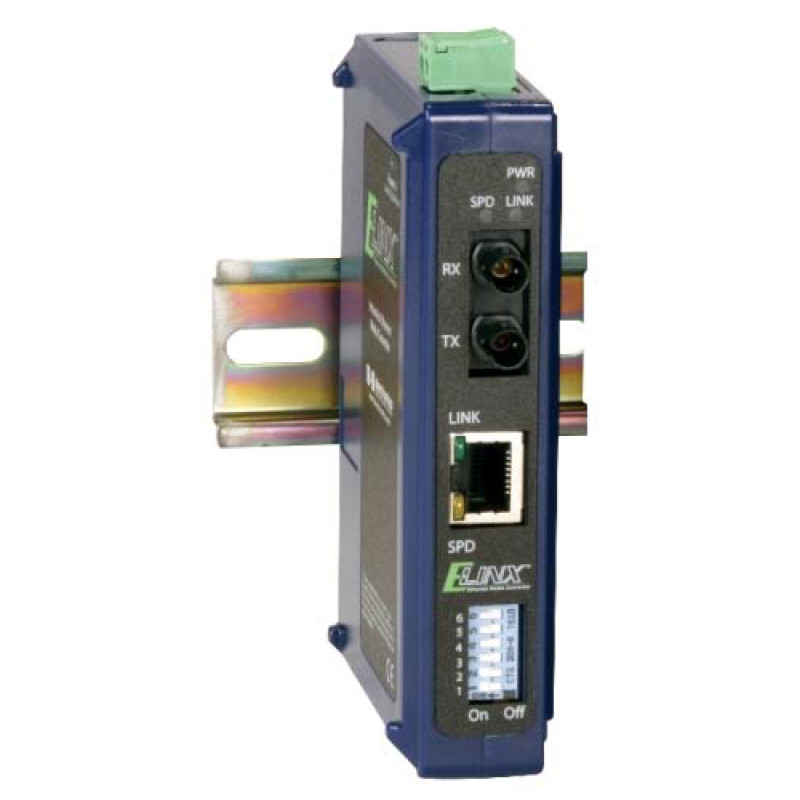
- Space-saving, slim IP30 housing with DIN rail mounting.
- Supports single-mode and multimode fiber optics. ST or SC connectors available.
- 10/100M, full/half duplex, MDI/MDI-X (auto negotiation).
- Compliance with IEEE 802.3/802.3u/802.3x standards.
- Range extension up to 80 km available.
- Wide supply voltage range, from 10 to 48VDC, with an easy-to-connect removable terminal block.
- LED power and transmission indicators.
- Segment switch controls the following parameters:
• 10/100 Mbps transmission speed (automatic selection or forced)
• Full or half duplex mode (automatic or forced)
• LFPT mechanism - in the event of a loss of connection on one side, it closes the connection on the other side - (enabled or disabled)
• Listen-in mode (remembering and (transfer or direct data transfer)
Media converters enable two Ethernet devices that use different physical data transfer media to communicate with each other. In most applications, media converters are used to convert a copper Ethernet link to a fiber optic link. The fiber can be multimode or single-mode, typically equipped with an ST or SC connector. Some of the most common reasons for using a media converter include expanding an Ethernet network, immunity to interference, and protection against surges and heavy pulses.
In addition to traditional media conversion, the EIR102 series allows conversion between different optical fibers. This is very convenient during upgrades when the installed fiber optics do not match the type of fiber used in the newly installed equipment. Mismatching between single-mode and multimode fibers is no longer a problem.
| Model |
Ports 10/100 |
Multimode Fiber |
Single-mode Fiber
|
EIR102-MT
|
1 |
1 (ST) |
|
EIR102-MC
|
1 |
1 (SC) |
|
EIR102-SC
|
1 |
|
1 (SC)
|
EIR102-ST
|
1 |
|
1 (ST)
|
EIR102-SC40
|
1 |
|
1 (SC) 40km
|
EIR102-ST40
|
1 |
|
1 (ST) 40 km
|
EIR102-SC80
|
1 |
|
1 (SC) 80km
|
EIR102-ST80
|
1 |
|
1 (ST) 80 km
|
EIR102-MT-SC
|
|
1 (ST) |
1 (SC)
|
EIR102-MT-ST
|
|
1 (ST) |
1 (ST)
|
EIR102-MC-SC
|
|
1 (SC) |
1 (SC)
|
EIR102-MC-ST
|
|
1 (SC) |
1 (ST)
|
For other fiber types, contact the manufacturer.
1. Connect a 10-48 VDC power supply to the removable terminal block on the top of the device.
2. Configure the converter by setting the segment switches on the front of the device. Converters that support fiber optic only have a 4-position segment switch. RJ-45-to-fiber converters have a 6-position segment switch. Table 1 shows the functions of each switch position.
3. Connect the network cables.
Table 1 - Segment Switch Functions
| Switch Position |
ON |
OFF |
| 1 |
Eavesdropping (saving and transmitting data) |
Eavesdropping (direct data transmission) |
| 2 |
Disabling the LFPT mechanism |
Enable the LFPT mechanism |
| 3 |
Top port, forced half-duplex mode |
Top port, forced full-duplex mode |
| 4 |
Bottom port, forced half-duplex mode |
Bottom port, forced full-duplex mode |
| 5* |
Forced speed of 10 Mbps on the RJ-45 side |
Forced speed of 100 Mbps on the RJ-45 side |
| 6* |
Forced operation mode on the RJ-45 side |
Autonegotiation enabled on the RJ-45 side |
|
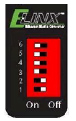 |
Default Configuration |
Technology
|
Standards:
|
IEEE802.3, 802.3u, 802.3x
|
|
Processing type:
|
Store and forward in full-duplex IEEE802.3x mode, non-blocking forwarding control
|
|
Forwarding control:
|
Forward Control IEEE802.3x, Feedback Control
|
|
Packet Buffer Memory:
Address Table Size
|
48 KB
2K MAC Addresses
|
Interface
|
RJ45 ports:
|
10/100BaseT(x) auto-negotiation, full/half duplex, auto MDI/MDI connection
|
|
Fiber ports:
LED indicators:
|
100BaseFX Ports (Multimode or Singlemode with ST or SC connector)
Power and Transmission
|
| Model |
Distance |
Wavelength |
Output Power |
Sensitivity |
EIR102-Mx
|
2 km |
1310 nm |
19 to 30 dBm |
≤ - 32 dBm |
EIR102-Sx
|
15 km |
1310 nm FP |
15 to 8 dBm |
≤ - 32 dBm |
EIR102-Sx40
|
40 km |
1310 nm FP |
5 to 0 dBm |
≤ - 34 dBm |
EIR102-Sx80
|
80 km |
1550 nm DFB |
5 to 0 dBm |
≤ - 34 dBm |
Note: The specifications for models with mixed fiber types are combinations of the above.
Power Operating Environment
|
Input Voltage.
|
10 to 48 VDC.
|
|
Power consumption
|
140 mA at 24VDC
|
|
Input connection
|
Replaceable terminal block
|
|
Protection
|
Reverse polarity protection
|
|
|
Operating temperature
|
0 to 60°C
|
|
Storage temperature
|
-40 to 80 °C
|
|
Humidity
|
0 to 95% non-condensing
|
|
Mean Time Between Failures
(Fiber/Fiber)
|
269729 hours
|
|
Mean Time Between Failures
(Fiber/Copper)
|
292645 hours
|
|
|
Mechanical specifications
|
Approvals required
|
|
Housing
|
IP 30 plastic housing
|
|
Dimensions (w/ST Con)
|
12.8x3.0x9.0 cm
|
|
Dimensions (w/SC Con)
|
12.8x3.0x9.0 cm
|
|
Installation
|
DIN rail mounting, 35mm
|
|
| EMI |
FCC Part 15 Class A, CISPR (EN55022) |
| EMS |
EN6100-4-2 (ESD), EN6100-4-3 (RS), EN6100-4-4 (EFT), EN6100-4-5 (Surge), EN6100-4-6 |
| Other |
(CS) |
|

 Industrial Communication Network