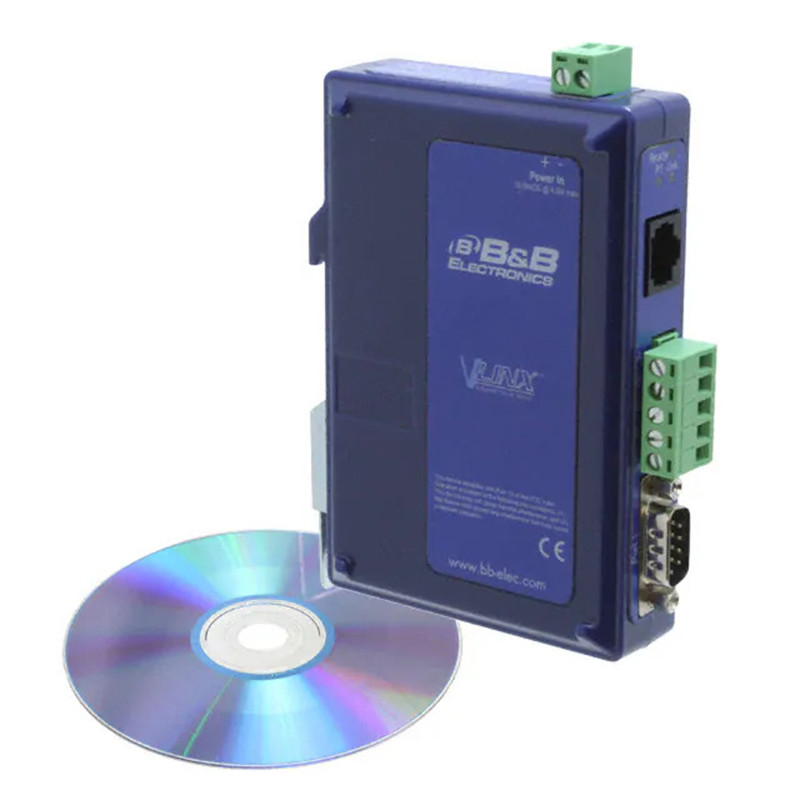
Supports serial ports over Ethernet with the option of transmitting over fiber optic links.
- Serial Port Servers
- Device Servers
- Extenders
- Unattended Switches
- Managed Switches
- Media Converters
Features
- Flat industrial housing
- Complete fiber optic options
- Web server, configuration software
- Low latency, high throughput.
- Heartbeat connection
- Pass-Through Ethernet port
Benefits
- Saves space on the DIN rail while maintaining industrial quality
- Multi-mode ST/SC, single mode (15, 40 and 80 km) ST/SC
- Programming via web browser or local port. Same user interface; No training required
- Status monitoring and real-time configuration
- Communication error detection and automatic connection to keep the system online
- VESR92X models offer a second Ethernet port that acts as an Ethernet switch
- 4-port versions will be available in Fall 2009
Specifications - Supports TCP Server, TCP Client, UDP, Virtual Serial Port, and Pairing Mode
- Auto-detects 10/100 Ethernet port
- Easy configuration via Web and Telnet connections
- Operating temperature: -34 to 74° C
- Operating voltage: 10-48 VDC
- Management: Multiple TCP client sessions
- VCOM drivers for Windows 2000, XP, and Vista
- Transfer rates up to 230 Kbps
Applications
- Programmable industrial controllers, drives, motor control, process analyzers
- Construction/retail/security - parking lot control, security, cameras
- Traffic management - lights, systems, cameras
- Connectivity via analog, cellular, and satellite modems
Easy-to-use configuration software.
Monitor, configure, and troubleshoot device operation in real time, from any web browser.
- New, simplified programming
- Basic and advanced views
- Automatic search function if radio settings are forgotten
- Easy firmware update in the field
If the device has a serial port and an Ethernet LAN or WAN, you can control this device using serial port servers. The PC in the control room will display the device as if it were connected directly to the monitor. You can configure the device for maximum performance without leaving your chair. You can even troubleshoot device operation via the internet from outside your LAN.
Vlinx™ Manager Software
Vlinx™ Manager software gives you desktop-level access to your entire facility. It allows you to configure devices, update firmware, and monitor activity. The Monitor Port feature allows you to use any PC on the LAN/WAN to monitor and troubleshoot the network and connected devices. It displays the traffic and status of connected devices.
Web Server
Serial port servers can be accessed and configured using any web browser (e.g., Internet Explorer) over the LAN/WAN. This allows you to remotely manage the software and serially connected devices. It also allows for off-site hardware troubleshooting.
A heartbeat connection ensures continuous connection
If a communication interruption occurs, the serial port server will attempt to reconnect every five seconds until successful. Without this helpful feature, a device that loses connection and stops transmitting will not be able to reconnect without technician intervention.
| Model Number |
Serial Ports* |
Serial Connector** |
Ethernet Port(s) |
Ethernet Bearer |
Ethernet Connector(s) |
VESR901
|
1 |
DB9 and TB |
10/100 Mbps |
Copper |
RJ45 |
VESR901-MC
|
1 |
DB9 and TB |
Multi-Mode Fiber |
Multi-Mode Fiber |
SC |
VESR901-MT
|
1 |
DB9 and TB |
Multi-Mode Fiber |
Multi-Mode Fiber |
ST |
VESR901-SC
|
1 |
DB9 and TB |
Single-Mode Fiber |
Single-Mode Fiber |
SC |
VESR901-ST
|
1 |
DB9 and TB |
Single-Mode Fiber |
Single-Mode Fiber |
ST |
VESR902D
|
2 |
DB9 |
10/100 Mbps |
Copper |
RJ45 |
VESR902D-MC
|
2 |
DB9 |
Multi-Mode Fiber |
Multi-Mode Fiber |
SC |
VESR902D-MT
|
2 |
DB9 |
Multi-Mode Fiber |
Multi-Mode Fiber |
ST |
VESR902D-SC
|
2 |
DB9 |
Single-Mode Fiber |
Single-Mode Fiber |
SC |
VESR902D-ST
|
2 |
DB9 |
Single-Mode Fiber |
Single-Mode Fiber |
ST |
VESR902T
|
2 |
TB |
10/100 Mbps |
Copper |
RJ45 |
VESR902T-MC
|
2 |
TB |
Multi-Mode optical fiber |
Multi-Mode Fiber |
SC |
VESR902T-MT
|
2 |
TB |
Multi-Mode Fiber |
Multi-Mode Fiber |
ST |
VESR902T-SC
|
2 |
TB |
Single-Mode Fiber |
Single-Mode Fiber |
SC |
VESR902T-ST
|
2 |
TB |
Single-Mode Fiber |
Single-Mode Fiber |
ST |
VESR921
|
1 |
DB9 and TB |
2 |
(2) Copper |
(2) RJ45 |
VESR921-MC
|
1 |
DB9 and TB |
2 |
Multi-Mode Fiber, Copper |
(1) SC, (1) RJ45 |
VESR921-MT
|
1 |
DB9 and TB |
2 |
Multi-Mode Fiber, Copper |
(1) ST, (1) RJ45 |
VESR921-SC
|
1 |
DB9 and TB |
2 |
Single-Mode Fiber, Copper |
(1) SC, (1) RJ45 |
VESR921-ST
|
1 |
DB9 and TB |
2 |
Single-Mode optical fiber, Copper |
(1) ST, (1) RJ45 |
VESR922T
|
2 |
TB |
2 |
(2) Copper |
(2) RJ45 |
VESR922T-MC
|
2 |
TB |
2 |
Multi-Mode Fiber, Copper |
(1) SC, (1) RJ45 |
VESR922T-MT
|
2 |
TB |
2 |
Multi-Mode Fiber, Copper |
(1) ST, (1) RJ45 |
VESR922T-SC
|
2 |
TB |
2 |
Single-Mode optical fiber, Copper |
(1) SC, (1) RJ45 |
VESR922T-ST
|
2 |
TB |
2 |
Single-Mode Fiber, Copper |
(1) ST, (1) RJ45 |
* All serial ports are software configurable to RS-232, RS-485, and RS-422.
**Models with one serial port offer DB9 and Terminal Block for serial connection. DB9 is used for RS-232, and the Terminal Block for RS-422/485.
40km, 80km versions available upon request. Visit www.bb-europe.com/VESR