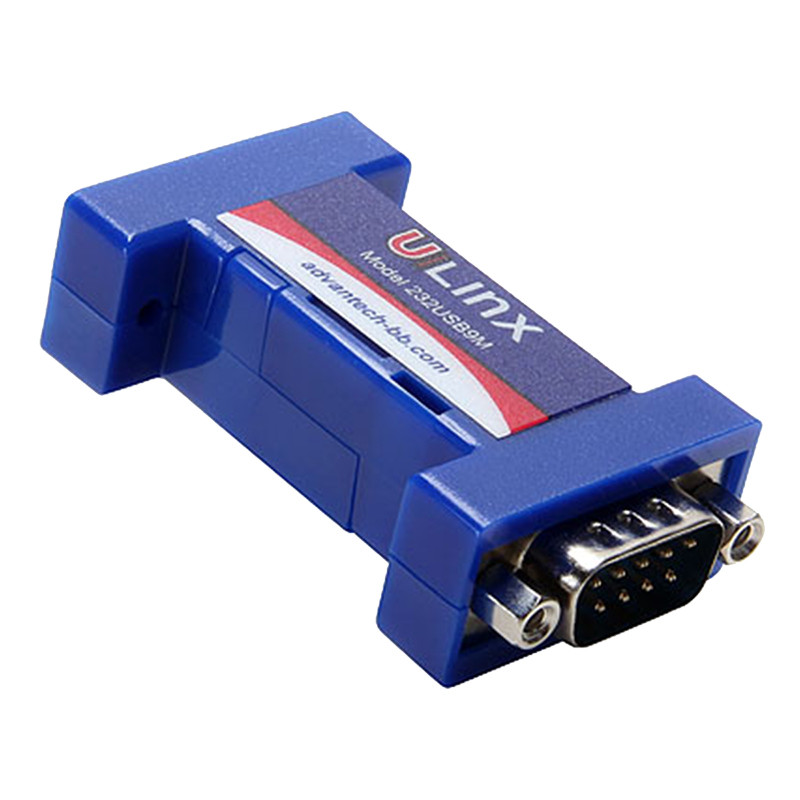
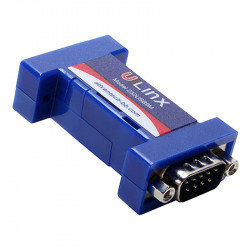
USB to RS232 converter - 232USB9M

Photos are for informational purposes only. View product specification

please use latin characters

Manufacturer: B&B Electronics

USB to RS232 converter - 232USB9M

Features

• Allows you to connect an RS-232 device to a USB port
• Powered by the USB port
• USB 2.0 compatible
• RS-232 data transfer speeds up to 460.8 kbps
• Automatic configuration in Windows 98, ME, 2000, XP, and Vista

Functional Description

The USB (Universal Serial Bus) standard has become a common access technology for modern PCs, replacing the previously popular serial ports. However, many commercial and industrial devices still use the RS-232 interface. Connecting these devices to modern PCs requires a simple and stable converter solution. The 232USB9M offers just such a solution, offered in a compact package and powered by USB. Simply connect the converter to an available USB port on your computer or to a USB hub and install the drivers provided on the CD-ROM. The device will be visible in Windows Device Manager as an additional COM port, fully compatible with Windows applications. A 1-meter USB cable is also included.


Ordering Information

Model Number
Description

232USB9M

USB to RS-232 converter
Accessories

USBAMBM-3F (One in set)

USB cable 1 m (3ft)

USBAMBM-6F

USB cable 2 m (6ft)

9PAMF6

DB9 male to DB9 female cable 2 m (6 ft)

9PAMF10

DB9 male to DB9 female cable 3 m (10 ft)

232NM9

DB9 female to DB9 female null modem cable 3 m (6 ft)

232NM9MF10

DB9 male to DB9 female null modem cable 3 m (10 ft)


Operational Description

• The drivers are located on the CD included with the converter. Connect the converter to an available USB port and insert the CD into the drive. The Add New Hardware Wizard will guide you through the installation process. The drivers are not available through Microsoft Windows Updates. When prompted to connect to Windows Updates for drivers, select "No, not now," and then install the drivers from the CD.
• After installing the drivers, the 232USB9M will appear in Windows Device Manager as the next available COM port, labeled "RS-232 Port." You can now configure this port for your use. The default port settings are 9600 bps, 8 data bits, no parity, 1 stop bit, and no flow control. The 232USB9M will also be available in the list of USB controllers.
• To uninstall the drivers, follow the instructions in the "read me" file on driver removal.
• The RS-232 connection uses a DB9 male DTE connector. More information about DTE and DCE connections and the RS-232 standard, as well as the connector pinout, can be found at the address below Table 1.


Table 1 RS-232 Pinout (DTE / DB9 male)

PINDirectionSignal Name
1 Input DCD (Receive Line Signal Detector)
2 Input RD (Receive Data)
3 Output TD (Transmit Data)
4 Output DTR (DTE Ready)
5 n/d SG (Signal Ground)
6 Input DSR (DCE Ready)
7 Output RTS (RequesttoSend)
8 Input CTS (Clear to Send)
9 Input RI (Ring Indicator)
General specification


Power
5VDC from USB port
Power Consumption
Low Power Device (
Operating Temperature
-40 to 176 °F (-40 to 80 °C)
Operating Humidity
0 to 95% non-condensing
USB plug
USB type B female
RS-232 plug
DB9 male
USB data transfer speed
12Mbps
RS-232 data transfer speed
460.8 kbps
USB standard
2.0 (downward compatible)
RS-232 Configuration
DTE
Dimensions
2.3 x 1.3 x .6 in (5.8 x 3.2 x 1.6 cm)
Mean time between failures (MTBF)
1946086 hours
Commits
CE, FCC

Send an inquiry

Are you interested in this product? Do you need additional information or individual pricing?

Contact us
ASK FOR THE PRODUCT close
Thank you for sending your message. We will respond as soon as possible.
ASK FOR THE PRODUCT close
Browse

Add to Wishlist

You must be logged in

Features

• Allows you to connect an RS-232 device to a USB port
• Powered by the USB port
• USB 2.0 compatible
• RS-232 data transfer speeds up to 460.8 kbps
• Automatic configuration in Windows 98, ME, 2000, XP, and Vista

Functional Description

The USB (Universal Serial Bus) standard has become a common access technology for modern PCs, replacing the previously popular serial ports. However, many commercial and industrial devices still use the RS-232 interface. Connecting these devices to modern PCs requires a simple and stable converter solution. The 232USB9M offers just such a solution, offered in a compact package and powered by USB. Simply connect the converter to an available USB port on your computer or to a USB hub and install the drivers provided on the CD-ROM. The device will be visible in Windows Device Manager as an additional COM port, fully compatible with Windows applications. A 1-meter USB cable is also included.


Ordering Information

Model Number
Description

232USB9M

USB to RS-232 converter
Accessories

USBAMBM-3F (One in set)

USB cable 1 m (3ft)

USBAMBM-6F

USB cable 2 m (6ft)

9PAMF6

DB9 male to DB9 female cable 2 m (6 ft)

9PAMF10

DB9 male to DB9 female cable 3 m (10 ft)

232NM9

DB9 female to DB9 female null modem cable 3 m (6 ft)

232NM9MF10

DB9 male to DB9 female null modem cable 3 m (10 ft)


Operational Description

• The drivers are located on the CD included with the converter. Connect the converter to an available USB port and insert the CD into the drive. The Add New Hardware Wizard will guide you through the installation process. The drivers are not available through Microsoft Windows Updates. When prompted to connect to Windows Updates for drivers, select "No, not now," and then install the drivers from the CD.
• After installing the drivers, the 232USB9M will appear in Windows Device Manager as the next available COM port, labeled "RS-232 Port." You can now configure this port for your use. The default port settings are 9600 bps, 8 data bits, no parity, 1 stop bit, and no flow control. The 232USB9M will also be available in the list of USB controllers.
• To uninstall the drivers, follow the instructions in the "read me" file on driver removal.
• The RS-232 connection uses a DB9 male DTE connector. More information about DTE and DCE connections and the RS-232 standard, as well as the connector pinout, can be found at the address below Table 1.


Table 1 RS-232 Pinout (DTE / DB9 male)

PINDirectionSignal Name
1 Input DCD (Receive Line Signal Detector)
2 Input RD (Receive Data)
3 Output TD (Transmit Data)
4 Output DTR (DTE Ready)
5 n/d SG (Signal Ground)
6 Input DSR (DCE Ready)
7 Output RTS (RequesttoSend)
8 Input CTS (Clear to Send)
9 Input RI (Ring Indicator)
General specification


Power
5VDC from USB port
Power Consumption
Low Power Device (
Operating Temperature
-40 to 176 °F (-40 to 80 °C)
Operating Humidity
0 to 95% non-condensing
USB plug
USB type B female
RS-232 plug
DB9 male
USB data transfer speed
12Mbps
RS-232 data transfer speed
460.8 kbps
USB standard
2.0 (downward compatible)
RS-232 Configuration
DTE
Dimensions
2.3 x 1.3 x .6 in (5.8 x 3.2 x 1.6 cm)
Mean time between failures (MTBF)
1946086 hours
Commits
CE, FCC
Comments (0)