
-
-
-
Category
-
Semiconductors
- Diodes
- Thyristors
-
Electro-insulated Modules
- Electro-insulated Modules | VISHAY (IR)
- Electro-insulated Modules | INFINEON (EUPEC)
- Electro-insulated Modules | Semikron
- Electro-insulated Modules | POWEREX
- Electro-insulated Modules | IXYS
- Electro-insulated Modules | POSEICO
- Electro-insulated Modules | ABB
- Electro-insulated Modules | TECHSEM
- Go to the subcategory
- Bridge Rectifiers
-
Transistors
- Transistors | GeneSiC
- SiC MOSFET Modules | Mitsubishi
- SiC MOSFET Modules | STARPOWER
- Module SiC MOSFET ABB’s
- IGBT Modules | MITSUBISHI
- Transistor Modules | MITSUBISHI
- MOSFET Modules | MITSUBISHI
- Transistor Modules | ABB
- IGBT Modules | POWEREX
- IGBT Modules | INFINEON (EUPEC)
- Silicon Carbide (SiC) semiconductor elements
- Go to the subcategory
- Gate Drivers
- Power Blocks
- Go to the subcategory
- Electrical Transducers
-
Passive components (capacitors, resistors, fuses, filters)
- Resistors
-
Fuses
- Miniature Fuses for electronic circuits - ABC & AGC Series
- Tubular Fast-acting Fuses
- Time-delay Fuse Links with GL/GG & AM characteristics
- Ultrafast Fuse Links
- Fast-acting Fuses (British & American standard)
- Fast-acting Fuses (European standard)
- Traction Fuses
- High-voltage Fuse Links
- Go to the subcategory
- Capacitors
- EMI Filters
- Supercapacitors
- Power surge protection
- TEMPEST emission revealing filters
- Surge arrester
- Go to the subcategory
-
Relays and Contactors
- Relays and Contactors - Theory
- 3-Phase AC Semiconductor Relays
- DC Semiconductor Relays
- Controllers, Control Systems and Accessories
- Soft Starters and Reversible Relays
- Electromechanical Relays
- Contactors
- Rotary Switches
-
Single-Phase AC Semiconductor Relays
- AC ONE PHASE RELAYS 1 series| D2425 | D2450
- One phase semiconductor AC relays CWA and CWD series
- One phase semiconductor AC relays CMRA and CMRD series
- One phase semiconductor AC relays - PS series
- Double and quadruple semiconductor AC relays - D24 D, TD24 Q, H12D48 D series
- One phase semiconductor relays - gn series
- Ckr series single phase solid state relays
- One phase AC semiconductor relays for DIN bus - ERDA I ERAA series
- 150A AC single phase relays
- Rail Mountable Solid State Relays With Integrated Heat Sink - ENDA, ERDA1 / ERAA1 series
- Go to the subcategory
- Single-Phase AC Semiconductor Relays for PCBs
- Interface Relays
- Go to the subcategory
- Cores and Other Inductive Components
- Heatsinks, Varistors, Thermal Protection
- Fans
- Air Conditioning, Accessories for Electrical Cabinets, Coolers
-
Batteries, Chargers, Buffer Power Supplies and Inverters
- Batteries, Chargers - Theoretical Description
- Modular Li-ion Battery Building Blocks, Custom Batteries, BMS
- Batteries
- Battery Chargers and Accessories
- Uninterruptible Power Supply and Buffer Power Supplies
- Inverters and Photovoltaic Equipments
- Energy storage
- Fuel cells
- Lithium-ion batteries
- Go to the subcategory
-
Automatics
- Spiralift Lifts
- Futaba Drone Parts
- Limit Switches, Microswitches
- Sensors, Transducers
-
Infrared Thermometers (Pyrometers)
- IR-TE Series - Water-proof Palm-sized Radiation Thermometer
- IR-TA Series - Handheld Type Radiation Thermometer
- IR-H Series - Handheld Type Radiation Thermometer
- IR-BA Series - High-speed Compact Radiation Thermometer
- IR-FA Series - Fiber Optic Radiation Thermometer
- IR-BZ Series - Compact Infrared Thermometers
- Go to the subcategory
- Counters, Time Relays, Panel Meters
- Industrial Protection Devices
- Light and Sound Signalling
- Thermographic Camera
- LED Displays
- Control Equipments
- Go to the subcategory
-
Cables, Litz wires, Conduits, Flexible connections
- Wires
- Cable feedthroughs and couplers
- Litz wires
-
Cables for extreme applications
- Extension and Compensation cables
- Thermocouple cables
- Connection cables for PT sensors
- Multi-conductor wires (temp. -60C to +1400C)
- Medium voltage cables
- Ignition wires
- Heating cables
- Single conductor cables (temp. -60C to +450C)
- Railway cables
- Heating cables Ex
- Cables for the defense industry
- Go to the subcategory
- Sleevings
-
Braids
- Flat Braids
- Round Braids
- Very Flexible Flat Braids
- Very Flexible Round Braids
- Cylindrical Cooper Braids
- Cylindrical Cooper Braids and Sleevings
- Flexible Earthing Connections
- PCV Insulated Copper Braids (temp. up to 85C)
- Flat Aluminium Braids
- Junction Set - Braids and Tubes
- Steel Braids
- Go to the subcategory
- Traction Equipment
- Cable Terminals
- Flexible Insulated Busbars
- Flexible Multilayer Busbars
- Cable Duct Systems
- Go to the subcategory
- View all categories
-
Semiconductors
-
-
Capacitive or resistive touch screen – which to choose?

Capacitive screen technology is today the most common solution in devices with touch panels – from smartphones, through information kiosks, to modern HMI systems in industrial automation. However, many users, especially in technical industries, still ask themselves the question: capacitive or resistive screen – which will be better for my application?
The choice of the appropriate type of touch screen depends on the working conditions, method of use, and the required precision and durability. Both technologies – capacitive and resistive touch screens – have their unique advantages. In this article, we will look at their differences, principles of operation, and typical applications, as well as present AD Metro solutions available in DACPOL’s offer.
How does a capacitive screen work?
A capacitive screen, also known as a capacitive touch screen, uses the phenomenon of electrostatic field changes. On the glass surface, there is a transparent conductive layer (usually made of indium tin oxide – ITO), which reacts to the touch of a finger or a conductive stylus. The controller analyzes differences in electrical capacitance and precisely determines the touch point.
This technology provides high sensitivity and precision, multi-touch support, and excellent optical clarity, making it ideal for applications where fast response and interface aesthetics are important.
Advantages of capacitive screens
- Supports multiple simultaneous touch points (gestures, zooming, rotation).
- High durability and scratch resistance thanks to the glass panel.
- High image quality and transparency.
- Modern, elegant appearance.
Typical applications of capacitive screens
- HMI systems and operator panels.
- Information kiosks, ticket machines.
- Medical and laboratory equipment.
- Consumer electronics (smartphones, tablets, monitors).
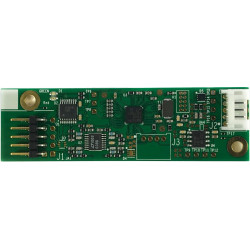
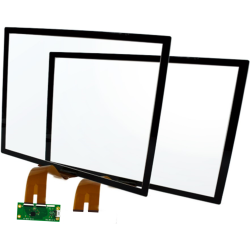
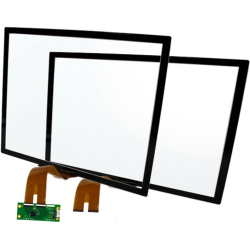
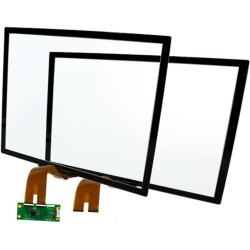
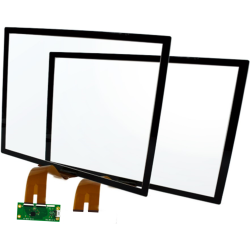
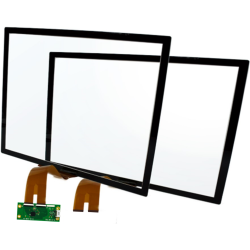
AD Metro’s offer includes, among others, ARGON PCAP controllers that automatically adapt to the size, orientation, and characteristics of the connected PCAP sensor. With a USB HID interface, they are compatible with most operating systems, which greatly simplifies integration.
How does a resistive screen work?
A resistive screen operates on a completely different principle. It consists of several transparent layers – most often two conductive films separated by a thin gap. When pressed with a finger, stylus, or another object, the layers make contact at the pressure point, allowing the controller to accurately determine the touch coordinates.
Unlike capacitive screens, resistive ones respond to pressure rather than conductivity, which means they can be operated with any object, even when wearing thick gloves or in conditions of heavy contamination.
Advantages of resistive screens
- Can be operated with gloves or a stylus.
- High resistance to electromagnetic interference (EMC).
- Operation in harsh conditions – moisture, dust, dirt, even contact with seawater.
- Low implementation cost.
Typical applications:
- Control panels in heavy industry and marine environments.
- Military, transport, and field devices.
- Medical and laboratory equipment used outdoors.
AD Metro offers dual-touch resistive controllers compatible with 5-wire resistive sensors. With USB HID communication and full resistance to external factors, they provide a reliable solution for applications requiring durability and precision.
Capacitive or resistive screen – which to choose?
The decision between these technologies depends primarily on the working environment and the desired user functions.
Capacitive screens operate by detecting touch through changes in capacitance at the point of contact, allowing for precise and fast operation, including multi-touch functions. These screens feature very high surface durability, usually made of glass, and excellent transparency. The downside is the limited ability to operate while wearing gloves – they only work with special conductive gloves. Capacitive screens are more expensive but offer a modern and comfortable user interface.
In contrast, a resistive screen responds to pressure, meaning contact between the screen layers. This allows operation with any type of glove or stylus, making these screens perfect for harsh outdoor and industrial environments. Multi-touch functions are limited to one or two touch points, but resistance to dirt is very high. The screen surface is durable but more susceptible to scratches than glass in capacitive screens, and transparency is slightly lower. Additionally, resistive screens are usually cheaper than capacitive ones, making them an attractive choice for industrial and tough working conditions.
If you need a fast, modern, and precise user interface, choose a capacitive screen.
If, however, resistance to environmental conditions, glove operation, and low failure rate are key, a resistive screen will be the better solution.
AD Metro solutions in DACPOL’s offer
AD Metro is a manufacturer specializing in advanced touch technologies, providing both capacitive (PCAP) and resistive screens along with compatible controllers.
In DACPOL’s offer, you will find, among others:
- ARGON PCAP controllers – adaptive capacitive solutions with USB HID and I²C interfaces.
- CR2T resistive controllers – durable, dual-point units for 5-wire screens.
- ULTRA sensors – ultra-thin, lightweight resistive screens for mobile applications.
The AD Metro brand has specialized for years in producing modern touch screens — both capacitive and resistive — used in the most demanding working environments. Thanks to their solutions, many industrial, military, and transport companies rely on touch technologies where standard panels fail.
AD Metro resistive screens are ideal for environments where durability and precision matter. Thanks to a design based on five-wire resistive sensors, devices can be operated not only with fingers but also with thick work gloves or a stylus. This makes them indispensable in applications such as:
- control panels in heavy industry,
- marine navigation systems,
- military equipment operating outdoors.
Modern controllers, such as the dual-touch AD Metro CR2T-02-5WN-02 controller, enable the use of gestures like pinch, zoom, and rotate — features previously typical only for capacitive screens. Combined with full resistance to electromagnetic interference (EMC) and the ability to operate in moisture, dirt, or even saltwater immersion, these systems set the standard for durability in the industrial screen segment.
Meanwhile, the capacitive screen from the ARGON PCAP series is the solution for users who value responsiveness, fluidity, and multi-touch. ARGON Adaptive PCAP controllers automatically adjust to the size, format, and orientation of the connected sensor, eliminating the need for calibration or additional software installation. This makes integration fast and operation stable and precise.
Importantly, these screens are fully compatible with the USB HID interface, allowing seamless operation with most operating systems without the need for additional drivers. For specialized applications, AD Metro also offers versions with I2C or RS-232 interfaces, facilitating integration in embedded or automation projects. DACPOL’s offer includes a full range of AD Metro products – from PCAP capacitive sensors and ULTRA resistive sensors to dedicated controllers and accessories. All solutions are designed for reliability and long service life in harsh industrial environments. Thanks to DACPOL’s cooperation with AD Metro, customers gain access not only to modern touch screens but also to technical support and advice in selecting the right system.
Summary
When choosing between a capacitive and a resistive screen, it is worth considering not only costs but, above all, the working environment and user needs. Capacitive technology is suitable where precision, aesthetics, and intuitive operation matter, while resistive screens remain irreplaceable in harsh industrial, military, or marine conditions. Both solutions can be found in DACPOL’s offer – the authorized distributor of AD Metro – who will help you choose the right touch screen for any application.
Related products
Related posts
Thermally conductive materials in power storages
Technological development caused a need in electric engineering to search for new solutions in heat conduction.
Read more
Measuring power and energy in electric circuits
Power meters and network parameter analyzers are intended for identifying anomalies of power supply in single-phase...
Read more
Wentylatory przemysłowe - rodzaje, właściwości
W zależności od obiektu, charakteru stanowisk pracowniczych, oraz szeregu indywidualnych czynników otoczenia w...
Read more
Leave a comment