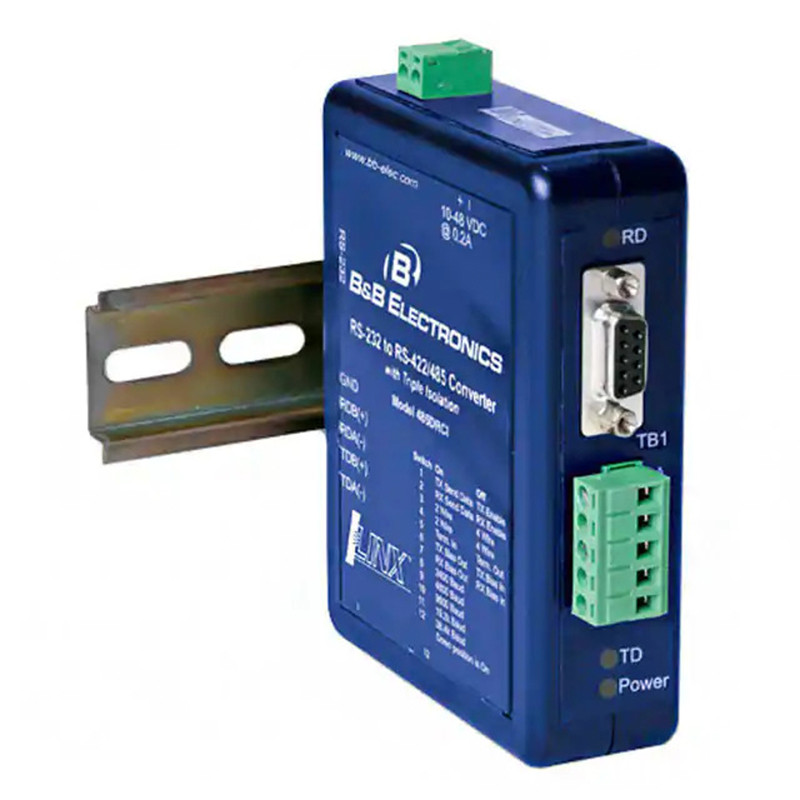
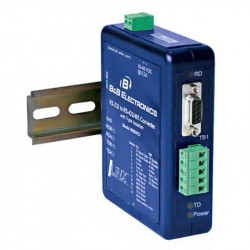
RS232-RS422/RS485 converter - execution with reinforcement - DIN bus - DIN-485DRCI

Photos are for informational purposes only. View product specification

please use latin characters

Manufacturer: B&B Electronics

RS232-RS422/RS485 converter - execution with reinforcement - DIN bus - DIN-485DRCI

- Data transfer rate up to 115.2 Kbps

- Power supply voltage range: 10 - 48 VDC

- Wide operating temperature range

- 3-way 2000V optoisolation

- Modbus ASCII/RTU compliant

- UL Class 1 Division 2 certified

The Ilinx™485DRCI is our premium RS-232 to RS-422/485 converter. Designed for demanding industrial applications, the converter is UL listed and certified for use in Class 1, Division 2 environments.

The DIN rail-mounted converter optically isolates and converts single-ended RS-232 signals in half-duplex mode to balanced RS-422/485 signals at speeds up to 115.2 Kbps. In addition to optical isolation, the unit features surge suppression on the RS-422/485 lines. Because it incorporates Automatic Send Data Control (ASDC) circuitry, the converter does not require software handshake control in RS-485 mode. Removable terminal blocks for power and RS-422/485 signals simplify wiring. The unit operates on a 10 to 48 VDC supply, isolated from ground on all data and signal lines. Configuration is simplified by a 12-position DIP switch on the bottom of the converter.

Remember, when it comes to reliable communication in demanding industrial environments, Ilinx™ converters and isolators from B[&]B Electronics are the best choice.


Specifications

Serial connection technology
RS-232
TD, RD, Ground
RS-485 2-wire
Data A(-), Data B (+), Ground
RS-422/485 4-wire
TDA(-), TDB(+), RDA (-), RDB(+), Ground
RS-232 PLN
DB9 Female (DCE)
RS-422/485 PLN
Removable terminal block, 28 to 14 AWG
Transfer rate
1.2 to 115.2 Kbps
Isolation
2000 V, 3-way (In, Out, Power)
Surge Protection
Peak Power Dissipation 600 W Response Time
Industrial Bus
MODBUS ASCII / RTU
Power
Source
External
Input voltage
10 to 48 VDC
Power consumption
960 mW
Connector
Removable terminal block, 28 to 14 AWG
Mechanical Specifications
LED Indicators
Sending, Receiving, and Power
Dimensions
11.4x3.3x12.4cm
Housing
35mm, DIN mounting, plastic, IP30
Weight
204.12 g
Working environment
Operating temperature
-40 to 80 °C
Storage temperature
-40 to 85°C
Operating Humidity
0 to 95% non-condensing
Regulatory Compliance
Approvals
FCC, CE, cUL, Class 1 Division 2
UL File No.
E222870 (C1 D2 E245458)
Mean Time Between
254617
Method for Calculating the Mean Time Between
Predicting Reliability Based on Part Count
Class 1, Division 2 Wiring
Type
Copper Wire Only
Size
28 to 14 AWG
Temperature
105°C - minimum
Clamp Torque
0.5 Nm (Newton-meters)
Package Contents

• Industrial RS-232 to RS-422/485 Converter, Model 485DRCI
• Datasheet
• Power Terminal Block (installed)
• RS-422/485 Terminal Block (installed)
If missing If any component is damaged or defective, contact B[&B Electronics for replacement.

Special Precautions for Class 1, Division 2 Environments

Special Instructions for Installation and Operation in Class 1, Division 2 Environments.
1. Power and input/output (I/O) wiring must comply with Class 1, Division 2 wiring methods [Article 501.10(B) of the National Electrical Code, NFPA70] and with local codes of the authority having jurisdiction.
2. WARNING - EXPLOSION HAZARD: REPLACEMENT OF COMPONENTS MAY LIMIT FITNESS FOR CLASS 1, DIVISION 2 APPLICATIONS.
3. WARNING - EXPLOSION HAZARD EXPLOSION HAZARD: IF EQUIPMENT IS INSTALLED IN A HAZARDOUS AREA, TURN OFF THE POWER BEFORE REPLACING OR WIRING MODULES.
4. WARNING - EXPLOSION HAZARD: DO NOT DISCONNECT EQUIPMENT UNTIL THE POWER HAS BEEN SWITCHED OFF OR UNTIL YOU KNOW THAT THE INSTALLATION LOCATION IS OUTSIDE THE HAZARDOUS AREA.
5. WARNING - THIS EQUIPMENT IS SUITABLE FOR USE IN CLASS 1, DIVISION 2, GROUPS A, B, C AND D LOCATIONS OR LOCATIONS UNCLASSIFIED.

Front Panel

Industrial RS-232 to RS-422/485 converter

1
Power terminal
2-position, replaceable
2
RD LED
Red receive LED, flashes when RS-422/485 data is received
3
DB9 F
RS-232 (Data Cable Equipment [DCE])
4
Clamp 422/485
5-position, replaceable
5
TD LED
Red transmit LED, flashes when RS-422/485 data is being sent.
6
Power LED
Red LED, ON when power is on.
7
Segment Switch
12-position
Segment Switch (SW1)

Industrial RS-232 to RS-422/485 Converter Segment Switch (SW1)
Pos. Enabled Disabled
1 RS-485 RS-422
2 Half duplex Full duplex
3 2-wire 4-wire
4 2-wire 4-wire
5 Load input Termination output
6 TX polarity input TX polarity output
7 RX polarity input RX polarity output
8 2400 baud
9 4800 baud
10 9600 baud
11 19.2kilobods
12 38.4 kilobaud


RS-232 DB9F (Data Communication Equipment [DCE])

Plug Signal Direction
1 Down Line Signal Detector (DCD) ---
2 Receiving data (RD) OUTPUT
3 Sending data (TD) INPUT
4 DTE Transmission Equipment (DTR) Readiness ---
5 Signal Cable Ground (SG) ---
6 DCE Communication Equipment Ready (DSR) ---
7 Request to Send (RTS) ---
8 Free to send (CTS) ---
9 Ring Indicator (RI) ---

1. The DB9 female connector is the DCE data transfer hardware.
2. Pin 2 (RD) is the converter's RS-232 data output.
3. Pin 3 (TD) is the converter's RS-232 data input.
4. Pins 1, 4, and 6 (DCD, DTR, and DSR) are internally connected with jumpers.
5. Pins 7 and 8 (RTS and CTS) are internally connected with jumpers.

RS-422/485 Terminal Strip

Clamp RS-485 2-wire RS-422/485 4-wire
A Ground Ground
B Data B(+) RDB(+)
C Data A(-) RDA(-)
D ... TDB(+)
E ... TDA(-)


DIN rail mounting

DIN rail mounting

1. Place the top of the DIN mount at an angle onto the top of the DIN rail.
2. Align the converter so that it is parallel to the DIN rail.
3. Snap the bottom of the DIN mount onto the rail.

RS-422/485 - Transfer Rate/Latency


Settable by switch

Transfer Rate (Kbps) SW1 8 SW1 9 SW1 10 SW1 11 SW1 12 Wait time (ms)
2.4 On Off Off Off Off 4.16
4.8 Off On Off Off Off 2.08
9.6 Off Off On Off Off 1.04
19.2 Off Off Off On Off 0.580
38.4 Off Off Off Off On 0.260


Set with a resistor

Transfer rate(Kbps) SW1-8 to 12 R-11 value Waittime (ms)
1.2 Off 820 KQ 8.33
57.6 Off 16 KQ 0.176
115.2 Off 8.2 KQ 0.087

1. Predefined transfer rates are set using positions 8 to 12 of SW1.
2. Resistor-set transfer rates are defined by inserting a through-hole resistor (R-11) on the printed circuit board.
3. WARNING - EXPLOSION HAZARD: SUBSTITUTION OF COMPONENTS MAY IMPAIR SUITABILITY FOR CLASS 1, DIVISION 2 APPLICATIONS.

RS-485 2-wire


RS-485 2-wire
Segment switch SW-1
Segment switch SW-1

1 2 3 4 5 6 7
On On On X Y Z

POSITIONS 8 TO 12 ARE USED TO SET THE TRANSFER RATE.

1. Loosen the screws to open the wire terminals A, B, and C.
2. Insert the 2-wire RS-485 signal wires. The terminal board accepts wire sizes 28 to 14 AWG.
3. Tighten the screws to close the wire terminals. Make sure the terminals hold the wires firmly. However, do not overtighten. For Class 1, Division 2 installations, ensure that the wiring complies with the special safety precautions and specifications table.
4. Configure the segment switch on the bottom of the converter for 2-wire RS-485 operation (see above).

X. ON = Load INPUT
OFF = Load OUTPUT
Y. ON = TX Bias INPUT
OFF = TX Bias OUTPUT
OFF = RX Bias INPUT
OFF = RX Bias OUTPUT

Installation Notes:
• In 2-wire mode, Pin B is connected to Pin D and Pin C is connected to Pin E using segment switches SW1-3 and SW1-4.
• If a load is required, a 120Ω resistor can be placed between Pins D and E by setting SW1-5 to the ON position.
• This converter has built-in 1.2KΩ pull-up/pull-down bias resistors. To utilize this bias, set SW1-6 and SW1-7 to the ON position.
• The B[&B Electronics RS-485 Application Note provides more information on loading and biasing. This reference document is available on our website.

RS-485 4 (full duplex)


RS-485 4 (full duplex)

SW-1 Segment Switch
SW-1 Segment Switch
1
2
3
4
5
6
7
On Off Off X Y Z
POSITIONS 8 TO 12 ARE USED TO SET THE TRANSFER RATE
  1. Loosen the screws to open the A, B, C, D, and E wire terminals.
  2. Insert the 4-wire RS-485 signal wires. The terminal board accepts wire sizes 28 to 14 AWG.
  3. Tighten the screws to close the wire terminals. Ensure the terminals hold the wires securely. However, do not overtighten. For Class 1, Division 2 installations, ensure that the wiring complies with the special safety precautions and specifications table.
  4. Configure the segment switch on the bottom of the converter for 2-wire RS-485 operation (see above).

X. ON = Load INPUT
OFF = Load OUTPUT
Y. ON = TX Bias INPUT
OFF = TX Bias OUTPUT
Z. ON = RX Bias INPUT
OFF = RX Bias OUTPUT

Installation Notes:
• If a load is required, a 120Ω resistor can be placed between pins D and E by setting SW1-5 to the ON position.
• This converter has built-in 1.2KΩ pull-up/pull-down bias resistors. To utilize this bias, set SW1-6 and SW1-7 to the ON position.
• The B[&B Electronics RS-485 Application Note provides more information on loading and biasing. This reference document is available on our website.

RS-422 (full-duplex)


RS-422 (full-duplex)

Segment Switch SW-1
Segment switch SW-1

1 2 3 4 5 6 7
Off Off Off Off X Y Z
POSITIONS 8 TO 12 ARE USED TO SET THE TRANSFER RATE.
  1. Loosen the screws to open the A, B, C, D, and E cable terminals.
  2. Insert the RS-422 signal cables. The terminal board accepts wire sizes 28 to 14 AWG.
  3. Tighten the screws to close the wire terminals. Ensure the terminals hold the wires securely. However, do not overtighten. For Class 1, Division 2 installations, ensure that the wiring complies with the special safety precautions and specifications table.
  4. Configure the segment switch on the bottom of the converter for 2-wire RS-485 operation (see above).

X. ON = Load INPUT
OFF = Load OUTPUT
Y. ON = TX Bias INPUT
OFF = TX Bias OUTPUT
Z. ON = RX Bias INPUT
OFF = RX Bias OUTPUT

Installation Notes:
• If a load is required, a 120Ω resistor can be placed between pins D and E by setting SW1-5 to the ON position.
• This converter has built-in 1.2KΩ pull-up/pull-down bias resistors. To utilize this bias, set SW1-6 and SW1-7 to the ON position.
• The B[&B Electronics RS-485 Application Note provides more information on loading and biasing. This reference document is available on our website.

Power Supply


1. Loosen the screw to open the terminal clamp on the terminal block.
2. Insert the power cable. The terminal accepts 28 to 14 AWG wires.
3. Tighten the screw to secure the terminal clamp to the terminal block. Make sure the clamp holds the wire securely. However, do not overtighten. For Class 1, Division 2 installations, ensure that the wiring complies with the special safety precautions and specifications table.

Loopback Test

Loopback Test
Segment Switch SW-1
Segment switch SW-1

1 2 3 4 5 6 7
On Off Off Off OFF OFF Off
POSITIONS 8 TO 12 ARE USED TO SET THE SCROLL RATE

Send an inquiry

Are you interested in this product? Do you need additional information or individual pricing?

Contact us
ASK FOR THE PRODUCT close
Thank you for sending your message. We will respond as soon as possible.
ASK FOR THE PRODUCT close
Browse

Add to Wishlist

You must be logged in

- Data transfer rate up to 115.2 Kbps

- Power supply voltage range: 10 - 48 VDC

- Wide operating temperature range

- 3-way 2000V optoisolation

- Modbus ASCII/RTU compliant

- UL Class 1 Division 2 certified

The Ilinx™485DRCI is our premium RS-232 to RS-422/485 converter. Designed for demanding industrial applications, the converter is UL listed and certified for use in Class 1, Division 2 environments.

The DIN rail-mounted converter optically isolates and converts single-ended RS-232 signals in half-duplex mode to balanced RS-422/485 signals at speeds up to 115.2 Kbps. In addition to optical isolation, the unit features surge suppression on the RS-422/485 lines. Because it incorporates Automatic Send Data Control (ASDC) circuitry, the converter does not require software handshake control in RS-485 mode. Removable terminal blocks for power and RS-422/485 signals simplify wiring. The unit operates on a 10 to 48 VDC supply, isolated from ground on all data and signal lines. Configuration is simplified by a 12-position DIP switch on the bottom of the converter.

Remember, when it comes to reliable communication in demanding industrial environments, Ilinx™ converters and isolators from B[&]B Electronics are the best choice.


Specifications

Serial connection technology
RS-232
TD, RD, Ground
RS-485 2-wire
Data A(-), Data B (+), Ground
RS-422/485 4-wire
TDA(-), TDB(+), RDA (-), RDB(+), Ground
RS-232 PLN
DB9 Female (DCE)
RS-422/485 PLN
Removable terminal block, 28 to 14 AWG
Transfer rate
1.2 to 115.2 Kbps
Isolation
2000 V, 3-way (In, Out, Power)
Surge Protection
Peak Power Dissipation 600 W Response Time
Industrial Bus
MODBUS ASCII / RTU
Power
Source
External
Input voltage
10 to 48 VDC
Power consumption
960 mW
Connector
Removable terminal block, 28 to 14 AWG
Mechanical Specifications
LED Indicators
Sending, Receiving, and Power
Dimensions
11.4x3.3x12.4cm
Housing
35mm, DIN mounting, plastic, IP30
Weight
204.12 g
Working environment
Operating temperature
-40 to 80 °C
Storage temperature
-40 to 85°C
Operating Humidity
0 to 95% non-condensing
Regulatory Compliance
Approvals
FCC, CE, cUL, Class 1 Division 2
UL File No.
E222870 (C1 D2 E245458)
Mean Time Between
254617
Method for Calculating the Mean Time Between
Predicting Reliability Based on Part Count
Class 1, Division 2 Wiring
Type
Copper Wire Only
Size
28 to 14 AWG
Temperature
105°C - minimum
Clamp Torque
0.5 Nm (Newton-meters)
Package Contents

• Industrial RS-232 to RS-422/485 Converter, Model 485DRCI
• Datasheet
• Power Terminal Block (installed)
• RS-422/485 Terminal Block (installed)
If missing If any component is damaged or defective, contact B[&B Electronics for replacement.

Special Precautions for Class 1, Division 2 Environments

Special Instructions for Installation and Operation in Class 1, Division 2 Environments.
1. Power and input/output (I/O) wiring must comply with Class 1, Division 2 wiring methods [Article 501.10(B) of the National Electrical Code, NFPA70] and with local codes of the authority having jurisdiction.
2. WARNING - EXPLOSION HAZARD: REPLACEMENT OF COMPONENTS MAY LIMIT FITNESS FOR CLASS 1, DIVISION 2 APPLICATIONS.
3. WARNING - EXPLOSION HAZARD EXPLOSION HAZARD: IF EQUIPMENT IS INSTALLED IN A HAZARDOUS AREA, TURN OFF THE POWER BEFORE REPLACING OR WIRING MODULES.
4. WARNING - EXPLOSION HAZARD: DO NOT DISCONNECT EQUIPMENT UNTIL THE POWER HAS BEEN SWITCHED OFF OR UNTIL YOU KNOW THAT THE INSTALLATION LOCATION IS OUTSIDE THE HAZARDOUS AREA.
5. WARNING - THIS EQUIPMENT IS SUITABLE FOR USE IN CLASS 1, DIVISION 2, GROUPS A, B, C AND D LOCATIONS OR LOCATIONS UNCLASSIFIED.

Front Panel

Industrial RS-232 to RS-422/485 converter

1
Power terminal
2-position, replaceable
2
RD LED
Red receive LED, flashes when RS-422/485 data is received
3
DB9 F
RS-232 (Data Cable Equipment [DCE])
4
Clamp 422/485
5-position, replaceable
5
TD LED
Red transmit LED, flashes when RS-422/485 data is being sent.
6
Power LED
Red LED, ON when power is on.
7
Segment Switch
12-position
Segment Switch (SW1)

Industrial RS-232 to RS-422/485 Converter Segment Switch (SW1)
Pos. Enabled Disabled
1 RS-485 RS-422
2 Half duplex Full duplex
3 2-wire 4-wire
4 2-wire 4-wire
5 Load input Termination output
6 TX polarity input TX polarity output
7 RX polarity input RX polarity output
8 2400 baud
9 4800 baud
10 9600 baud
11 19.2kilobods
12 38.4 kilobaud


RS-232 DB9F (Data Communication Equipment [DCE])

Plug Signal Direction
1 Down Line Signal Detector (DCD) ---
2 Receiving data (RD) OUTPUT
3 Sending data (TD) INPUT
4 DTE Transmission Equipment (DTR) Readiness ---
5 Signal Cable Ground (SG) ---
6 DCE Communication Equipment Ready (DSR) ---
7 Request to Send (RTS) ---
8 Free to send (CTS) ---
9 Ring Indicator (RI) ---

1. The DB9 female connector is the DCE data transfer hardware.
2. Pin 2 (RD) is the converter's RS-232 data output.
3. Pin 3 (TD) is the converter's RS-232 data input.
4. Pins 1, 4, and 6 (DCD, DTR, and DSR) are internally connected with jumpers.
5. Pins 7 and 8 (RTS and CTS) are internally connected with jumpers.

RS-422/485 Terminal Strip

Clamp RS-485 2-wire RS-422/485 4-wire
A Ground Ground
B Data B(+) RDB(+)
C Data A(-) RDA(-)
D ... TDB(+)
E ... TDA(-)


DIN rail mounting

DIN rail mounting

1. Place the top of the DIN mount at an angle onto the top of the DIN rail.
2. Align the converter so that it is parallel to the DIN rail.
3. Snap the bottom of the DIN mount onto the rail.

RS-422/485 - Transfer Rate/Latency


Settable by switch

Transfer Rate (Kbps) SW1 8 SW1 9 SW1 10 SW1 11 SW1 12 Wait time (ms)
2.4 On Off Off Off Off 4.16
4.8 Off On Off Off Off 2.08
9.6 Off Off On Off Off 1.04
19.2 Off Off Off On Off 0.580
38.4 Off Off Off Off On 0.260


Set with a resistor

Transfer rate(Kbps) SW1-8 to 12 R-11 value Waittime (ms)
1.2 Off 820 KQ 8.33
57.6 Off 16 KQ 0.176
115.2 Off 8.2 KQ 0.087

1. Predefined transfer rates are set using positions 8 to 12 of SW1.
2. Resistor-set transfer rates are defined by inserting a through-hole resistor (R-11) on the printed circuit board.
3. WARNING - EXPLOSION HAZARD: SUBSTITUTION OF COMPONENTS MAY IMPAIR SUITABILITY FOR CLASS 1, DIVISION 2 APPLICATIONS.

RS-485 2-wire


RS-485 2-wire
Segment switch SW-1
Segment switch SW-1

1 2 3 4 5 6 7
On On On X Y Z

POSITIONS 8 TO 12 ARE USED TO SET THE TRANSFER RATE.

1. Loosen the screws to open the wire terminals A, B, and C.
2. Insert the 2-wire RS-485 signal wires. The terminal board accepts wire sizes 28 to 14 AWG.
3. Tighten the screws to close the wire terminals. Make sure the terminals hold the wires firmly. However, do not overtighten. For Class 1, Division 2 installations, ensure that the wiring complies with the special safety precautions and specifications table.
4. Configure the segment switch on the bottom of the converter for 2-wire RS-485 operation (see above).

X. ON = Load INPUT
OFF = Load OUTPUT
Y. ON = TX Bias INPUT
OFF = TX Bias OUTPUT
OFF = RX Bias INPUT
OFF = RX Bias OUTPUT

Installation Notes:
• In 2-wire mode, Pin B is connected to Pin D and Pin C is connected to Pin E using segment switches SW1-3 and SW1-4.
• If a load is required, a 120Ω resistor can be placed between Pins D and E by setting SW1-5 to the ON position.
• This converter has built-in 1.2KΩ pull-up/pull-down bias resistors. To utilize this bias, set SW1-6 and SW1-7 to the ON position.
• The B[&B Electronics RS-485 Application Note provides more information on loading and biasing. This reference document is available on our website.

RS-485 4 (full duplex)


RS-485 4 (full duplex)

SW-1 Segment Switch
SW-1 Segment Switch
1
2
3
4
5
6
7
On Off Off X Y Z
POSITIONS 8 TO 12 ARE USED TO SET THE TRANSFER RATE
  1. Loosen the screws to open the A, B, C, D, and E wire terminals.
  2. Insert the 4-wire RS-485 signal wires. The terminal board accepts wire sizes 28 to 14 AWG.
  3. Tighten the screws to close the wire terminals. Ensure the terminals hold the wires securely. However, do not overtighten. For Class 1, Division 2 installations, ensure that the wiring complies with the special safety precautions and specifications table.
  4. Configure the segment switch on the bottom of the converter for 2-wire RS-485 operation (see above).

X. ON = Load INPUT
OFF = Load OUTPUT
Y. ON = TX Bias INPUT
OFF = TX Bias OUTPUT
Z. ON = RX Bias INPUT
OFF = RX Bias OUTPUT

Installation Notes:
• If a load is required, a 120Ω resistor can be placed between pins D and E by setting SW1-5 to the ON position.
• This converter has built-in 1.2KΩ pull-up/pull-down bias resistors. To utilize this bias, set SW1-6 and SW1-7 to the ON position.
• The B[&B Electronics RS-485 Application Note provides more information on loading and biasing. This reference document is available on our website.

RS-422 (full-duplex)


RS-422 (full-duplex)

Segment Switch SW-1
Segment switch SW-1

1 2 3 4 5 6 7
Off Off Off Off X Y Z
POSITIONS 8 TO 12 ARE USED TO SET THE TRANSFER RATE.
  1. Loosen the screws to open the A, B, C, D, and E cable terminals.
  2. Insert the RS-422 signal cables. The terminal board accepts wire sizes 28 to 14 AWG.
  3. Tighten the screws to close the wire terminals. Ensure the terminals hold the wires securely. However, do not overtighten. For Class 1, Division 2 installations, ensure that the wiring complies with the special safety precautions and specifications table.
  4. Configure the segment switch on the bottom of the converter for 2-wire RS-485 operation (see above).

X. ON = Load INPUT
OFF = Load OUTPUT
Y. ON = TX Bias INPUT
OFF = TX Bias OUTPUT
Z. ON = RX Bias INPUT
OFF = RX Bias OUTPUT

Installation Notes:
• If a load is required, a 120Ω resistor can be placed between pins D and E by setting SW1-5 to the ON position.
• This converter has built-in 1.2KΩ pull-up/pull-down bias resistors. To utilize this bias, set SW1-6 and SW1-7 to the ON position.
• The B[&B Electronics RS-485 Application Note provides more information on loading and biasing. This reference document is available on our website.

Power Supply


1. Loosen the screw to open the terminal clamp on the terminal block.
2. Insert the power cable. The terminal accepts 28 to 14 AWG wires.
3. Tighten the screw to secure the terminal clamp to the terminal block. Make sure the clamp holds the wire securely. However, do not overtighten. For Class 1, Division 2 installations, ensure that the wiring complies with the special safety precautions and specifications table.

Loopback Test

Loopback Test
Segment Switch SW-1
Segment switch SW-1

1 2 3 4 5 6 7
On Off Off Off OFF OFF Off
POSITIONS 8 TO 12 ARE USED TO SET THE SCROLL RATE
Comments (0)