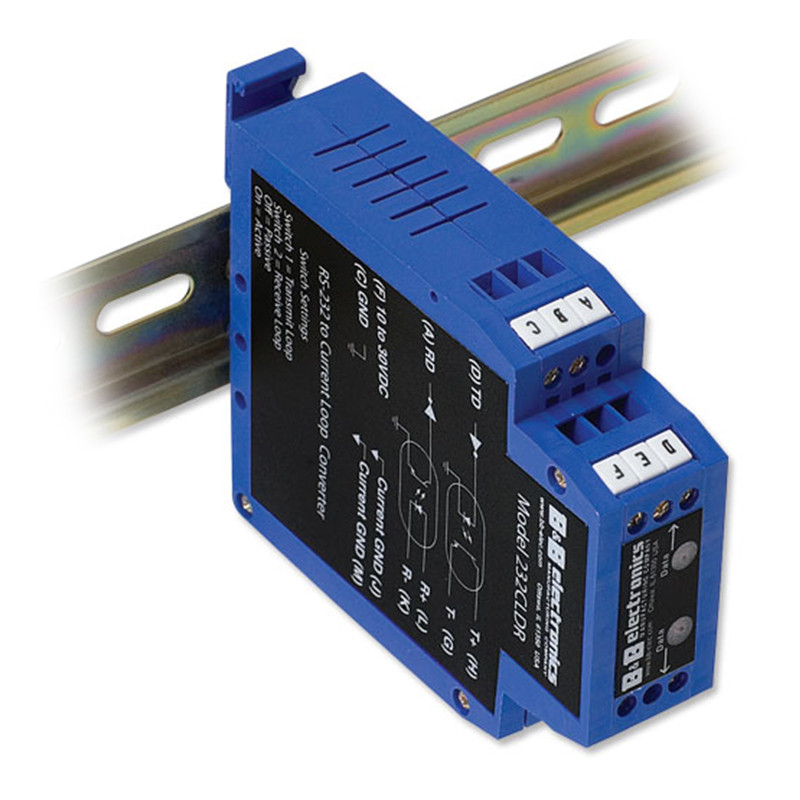
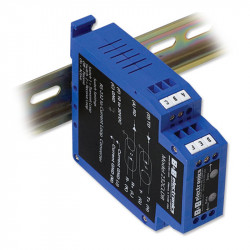
RS232 converter - circuit loop - optoinsulator - 232CLDR

Photos are for informational purposes only. View product specification

please use latin characters

Manufacturer: B&B Electronics

RS232 converter - circuit loop - optoinsulator - 232CLDR

The 232CLDR device is a DIN rail-mounted version of B[&]B's RS-232 current loop converter. The device is equipped with one optically isolated 20mA transmit loop and one optically isolated 20mA receive loop. Each loop can be set to "Active" or "Passive" mode. When set to "Active" mode, an isolated 20mA current is supplied to each loop (transmitting and receiving). Only a single power source with a voltage of 10V to 30V DC is required to power the converter and both loops. Terminal block (A) is the RS-232 OUT (from the 232CLDR), and terminal block (D) is the RS-232 IN (to the 232CLDR). The 232CLDR can communicate at a maximum baud rate of 19.2 KBd. The 20mA current loop is suitable for distances up to 600 meters at data rates up to 19.2 KBd thanks to a carefully designed interface. Below are a series of diagrams that show different ways to test and configure the 232CLDR converter.

Active or Passive Mode

The 232CLDR converter can be switched between active and passive mode using a switch. Figures 1-4 show four different ways to configure the 232CLDR using two PCs. To set SW1 and SW2, open the cover of the 232CLDR converter. To open the 232CLDR, remove the side cover with a flat-blade screwdriver. Insert the flat-blade screwdriver under the cover labeled "Model 232CLDR" and pry it open. The cover latches will release (click). There is a segmented toggle switch on the circuit board.

Tables 1 and 2 (Transmit and Receive, respectively) show the connection configuration for active and passive modes. If you are using a separate current loop device (printer, scale, CNC, etc.), check the device's documentation to determine whether it is configured for active or passive mode. If you don't know whether the device is operating in active or passive mode, you can easily check it with a voltmeter. To do this, set the voltmeter to DC and place the positive (red) probe on the T+ output and the negative (black) probe on the T- output of the current loop device. If the voltmeter indicates the presence of voltage, the device is operating in active mode. If no voltage is present, the device is operating in passive mode.
Model: 232CLDR connection
PC Serial Port Connections [DTE]
DB9 Male Serial Connector ....................................................
Pin 2 - Receive (Input)
Pin 3 - Transmit (Output)
Pin 5 - UZ (Ground)
................................................... Transmission line ground
DB25 male serial connector
Pin 2 - Transmit (Output)
Pin 3 - Receive (Input)
Pin 5 - UZ (Ground)
OFF Figure 1
Figure 1 shows the loopback test for the 232CLDR. This test verifies that the 232CLDR is operating correctly. The test involves sending a series of characters from the PC's RS-232 port, which will be transmitted back to the PC's RS-232 port by the 232CLDR.
RS-232 ,
COM Port
Active 232CLDR Passive 232CLDR Port C0M R
S-232
Model: 232CLDR Model: 232CLDR Model: 232CLDR
Output) (Output)
Input] [Input]
Ground) (Ground
Transmission and Power Line Ground Switches 1 [&]2 ON Switches 1 [&]2 OFF. Grounding the Transmission and Power Lines

Figure 2


Figure 2 shows an example connection of two 232CLDR converters. The 232CLDR on the left is set to "active" and the 232CLDR on the right is set to "passive."

C0M port RS-232

232CLDR 232CLDR Port C0M
RS-232
Output) (Output)
Input] [Input]
Ground) (Ground)

Transmission and Power Line Grounding

Switch Settings = Switch 1 ON [&] Switch 2 OFF on both 232CLDR converters

Transmission and Power Line Grounding


Figure 3


Figure 3 is a wiring diagram showing the "active" transmit and "passive" receive configuration for both 232CLDR converters.

C0M port RS-232

232CLDR 232CLDR Port C0M
RS-232
Output) (Output)
Input] [Input]
Ground) (Ground)
Transmission and Power Line Grounding
Switch Settings = Switch 1 ON [&] Switch 2 OFF on both 232CLDR converters
Transmission and Power Line Grounding

Figure 4


Figure 4 is a wiring diagram showing the "active" receive and "passive" transmit configuration for both 232CLDR converters.

Table 1: Transmit
Table 2: Receive
SW1 H G J
Active Tue Not
connected
Connect
to R+
Connect
to R-
Passive Off Connect
to R+
Connect
to R-
NC
SW2 L K M
Active Tue Not connected Connect to T+ Connect to T-
Passive Off Connect to T+ Connect to T- NC

Typical Applications
Figure 5 shows a typical application of a scale with an "active" current loop and a 232CLDR converter operating in "passive" mode. Some scale manufacturers sell devices equipped with a current loop interface. The scale can be replaced with any other device with an "active" current loop. The figure shows the general principle of connecting a device with an "active" current loop (transmitting only) to the converter 232CLDR (set to "passive" mode).
Comm RS-232 port Passive 232CLDR Active current loop scale

(Output)
Input)
Ground)
Power Line Ground Transmission and Switches 1 [&]2 OFF

Figure 5


Typical Connection to a Current Loop Scale

Specifications
Dimensions:
25.1 x 78.8 x 105.6 mm
Temperature range:
0 to 80°C
Humidity range:
0 to 95% non-condensing
Supply voltage:
+10 to 30V DC at 100mA
Transfer rate
Up to 19.2 kbps
Data:
Connectors:
Screw-on terminal blocks for RS-232 and current loop sides
LEDs:
Two RED LEDs indicate data flow direction
Isolation:
1000 V DC isolation for 1 second

Figure 7. 232CLDR Schematic


Send an inquiry

Are you interested in this product? Do you need additional information or individual pricing?

Contact us
ASK FOR THE PRODUCT close
Thank you for sending your message. We will respond as soon as possible.
ASK FOR THE PRODUCT close
Browse

Add to Wishlist

You must be logged in

The 232CLDR device is a DIN rail-mounted version of B[&]B's RS-232 current loop converter. The device is equipped with one optically isolated 20mA transmit loop and one optically isolated 20mA receive loop. Each loop can be set to "Active" or "Passive" mode. When set to "Active" mode, an isolated 20mA current is supplied to each loop (transmitting and receiving). Only a single power source with a voltage of 10V to 30V DC is required to power the converter and both loops. Terminal block (A) is the RS-232 OUT (from the 232CLDR), and terminal block (D) is the RS-232 IN (to the 232CLDR). The 232CLDR can communicate at a maximum baud rate of 19.2 KBd. The 20mA current loop is suitable for distances up to 600 meters at data rates up to 19.2 KBd thanks to a carefully designed interface. Below are a series of diagrams that show different ways to test and configure the 232CLDR converter.

Active or Passive Mode

The 232CLDR converter can be switched between active and passive mode using a switch. Figures 1-4 show four different ways to configure the 232CLDR using two PCs. To set SW1 and SW2, open the cover of the 232CLDR converter. To open the 232CLDR, remove the side cover with a flat-blade screwdriver. Insert the flat-blade screwdriver under the cover labeled "Model 232CLDR" and pry it open. The cover latches will release (click). There is a segmented toggle switch on the circuit board.

Tables 1 and 2 (Transmit and Receive, respectively) show the connection configuration for active and passive modes. If you are using a separate current loop device (printer, scale, CNC, etc.), check the device's documentation to determine whether it is configured for active or passive mode. If you don't know whether the device is operating in active or passive mode, you can easily check it with a voltmeter. To do this, set the voltmeter to DC and place the positive (red) probe on the T+ output and the negative (black) probe on the T- output of the current loop device. If the voltmeter indicates the presence of voltage, the device is operating in active mode. If no voltage is present, the device is operating in passive mode.
Model: 232CLDR connection
PC Serial Port Connections [DTE]
DB9 Male Serial Connector ....................................................
Pin 2 - Receive (Input)
Pin 3 - Transmit (Output)
Pin 5 - UZ (Ground)
................................................... Transmission line ground
DB25 male serial connector
Pin 2 - Transmit (Output)
Pin 3 - Receive (Input)
Pin 5 - UZ (Ground)
OFF Figure 1
Figure 1 shows the loopback test for the 232CLDR. This test verifies that the 232CLDR is operating correctly. The test involves sending a series of characters from the PC's RS-232 port, which will be transmitted back to the PC's RS-232 port by the 232CLDR.
RS-232 ,
COM Port
Active 232CLDR Passive 232CLDR Port C0M R
S-232
Model: 232CLDR Model: 232CLDR Model: 232CLDR
Output) (Output)
Input] [Input]
Ground) (Ground
Transmission and Power Line Ground Switches 1 [&]2 ON Switches 1 [&]2 OFF. Grounding the Transmission and Power Lines

Figure 2


Figure 2 shows an example connection of two 232CLDR converters. The 232CLDR on the left is set to "active" and the 232CLDR on the right is set to "passive."

C0M port RS-232

232CLDR 232CLDR Port C0M
RS-232
Output) (Output)
Input] [Input]
Ground) (Ground)

Transmission and Power Line Grounding

Switch Settings = Switch 1 ON [&] Switch 2 OFF on both 232CLDR converters

Transmission and Power Line Grounding


Figure 3


Figure 3 is a wiring diagram showing the "active" transmit and "passive" receive configuration for both 232CLDR converters.

C0M port RS-232

232CLDR 232CLDR Port C0M
RS-232
Output) (Output)
Input] [Input]
Ground) (Ground)
Transmission and Power Line Grounding
Switch Settings = Switch 1 ON [&] Switch 2 OFF on both 232CLDR converters
Transmission and Power Line Grounding

Figure 4


Figure 4 is a wiring diagram showing the "active" receive and "passive" transmit configuration for both 232CLDR converters.

Table 1: Transmit
Table 2: Receive
SW1 H G J
Active Tue Not
connected
Connect
to R+
Connect
to R-
Passive Off Connect
to R+
Connect
to R-
NC
SW2 L K M
Active Tue Not connected Connect to T+ Connect to T-
Passive Off Connect to T+ Connect to T- NC

Typical Applications
Figure 5 shows a typical application of a scale with an "active" current loop and a 232CLDR converter operating in "passive" mode. Some scale manufacturers sell devices equipped with a current loop interface. The scale can be replaced with any other device with an "active" current loop. The figure shows the general principle of connecting a device with an "active" current loop (transmitting only) to the converter 232CLDR (set to "passive" mode).
Comm RS-232 port Passive 232CLDR Active current loop scale

(Output)
Input)
Ground)
Power Line Ground Transmission and Switches 1 [&]2 OFF

Figure 5


Typical Connection to a Current Loop Scale

Specifications
Dimensions:
25.1 x 78.8 x 105.6 mm
Temperature range:
0 to 80°C
Humidity range:
0 to 95% non-condensing
Supply voltage:
+10 to 30V DC at 100mA
Transfer rate
Up to 19.2 kbps
Data:
Connectors:
Screw-on terminal blocks for RS-232 and current loop sides
LEDs:
Two RED LEDs indicate data flow direction
Isolation:
1000 V DC isolation for 1 second

Figure 7. 232CLDR Schematic


Comments (0)